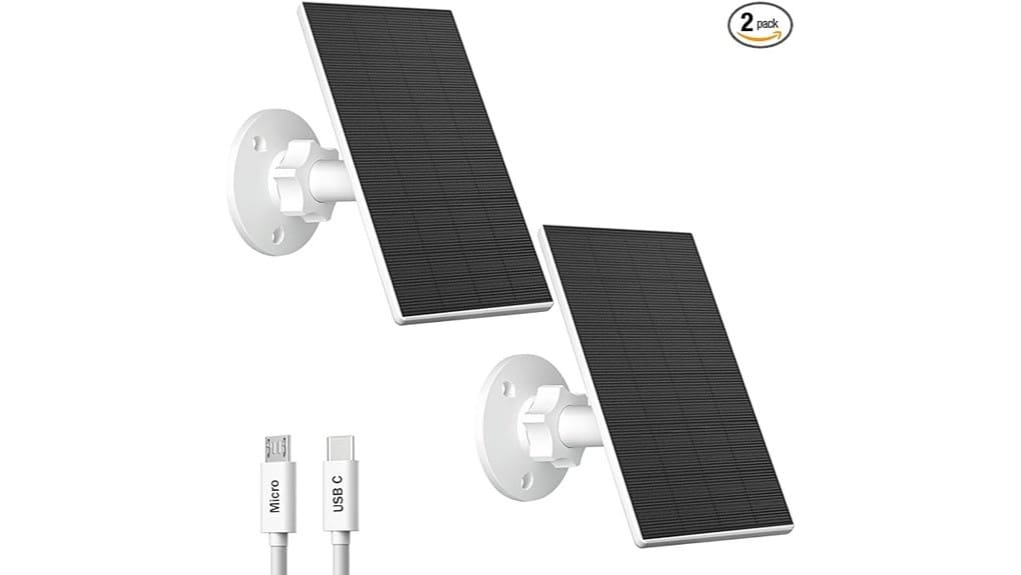
You’ll find the Zivif 2W solar panel is a compact, low-cost trickle charger that’ll maintain many rechargeable security cameras in direct sun but won’t replace batteries under low-light or heavy use. It delivers up to 2W via a 7.2 ft USB-A to USB-C/Micro cable, mounts with adjustable brackets, and meets IP65 for basic outdoor durability. It’s best if you need inexpensive supplemental charging; continue for specifics on performance, compatibility, and alternatives.
Some Key Takeaways
- Delivers up to 2W via a 7.2 ft cable with USB-A to USB-C for trickle charging compatible rechargeable security cameras.
- Best used as a low-cost supplemental charger, not a replacement for batteries under low-light conditions.
- IP65-rated, tempered glass, and adjustable 360° bracket support reliable outdoor mounting and seasonal aiming.
- Peak midday output sustains small cameras; performance drops sharply with shading or low-angle sun.
- Not compatible with Eufy, Arlo, Blink, Ring, Nest, Kasa, or strictly plug-in cameras; consider higher-watt or vendor-specific alternatives.
Quick Verdict: Is the Zivif 2W Solar Panel Worth It?
Although it lacks a built-in battery, the Zivif 2W solar panel delivers a practical, low-cost way to keep compatible rechargeable security cameras topped up under direct daylight. You’ll assess trade-offs: modest 2W output reduces battery drain but won’t replace batteries during low light, so battery lifespan still depends on camera use and environment. Installation costs remain low; included brackets and screws simplify mounting, minimizing labor or accessory purchases. You’ll appreciate IP65 durability and adjustable aiming for peak irradiation. Impartially, it’s a cost-effective supplemental charger if you accept limited output and no onboard energy storage. It’s particularly suited for users of portable power systems who need an inexpensive supplemental charging option.
Compatibility: Which Cameras Work and Which Ones Won’t?
When evaluating compatibility, start by checking your camera’s charging port and power requirements against the Zivif’s output and connector options: the panels supply up to 2W via a 7.2 ft cable and come with USB-A to USB-C leads, so they’ll work with most rechargeable battery-powered cameras that accept Micro USB or USB-C charging and tolerate a low-watt trickle input. You’ll find reliable camera compatibility with many third-party models and some generics. Unsupported brands include Eufy, Arlo, Blink, Ring, Google Nest and Kasa, plus strictly plug-in cameras without batteries—those won’t accept this panel’s direct trickle approach. This product is aimed at users of portable power and backup generators and complements portable projector gear setups for off-grid use.
Real-World Power Performance and Placement Tips
If you place the Zivif 2W panels in direct, unobstructed sunlight they’ll supply a steady trickle charge sufficient to maintain most small rechargeable security cameras. You’ll monitor charging benchmarks under real conditions: peak midday output, reduced early/late production, and expected current under partial shade. For angle optimization, use the 360° bracket to match local sun path seasonally. For shading mitigation, identify and eliminate transient shadows from trees or eaves; even brief shading lowers average output disproportionately. Placement timing matters—install and test during a representative solar week to confirm sustained charge rates and adjust orientation for consistent performance. These panels are well suited for users of portable power and backup power generators and other portable solar gear in the field.
Weatherproofing, Durability, and Maintenance You Should Expect
Because the Zivif 2W panels carry an IP65 rating and a wide operating temperature range, you can expect reliable outdoor operation in rain, wind, and most cold-to-hot climates without added enclosure protection. You’ll assess weather resistance objectively: sealed junctions and tempered glass reduce ingress and impact risk, but harsh salt or debris environments need monitoring. For panel longevity, plan a simple maintenance schedule: inspect seals and mountings quarterly and after storms, verify connectors monthly, and log output to detect degradation. Use gentle cleaning techniques—soft damp cloth, no solvents—to preserve coatings and maximize energy yield over time. These portable solar panels are well-suited for users of portable power and backup generators in outdoor or mobile applications.
Buy or Skip? Who This Panel Is Best For and Alternative Options
Who should buy the Zivif 2W solar panel and who should skip it? If you use compatible rechargeable battery cameras and need a low-power, weatherproof trickle charger, you’ll appreciate included mounting accessories, 360° adjustability, and straightforward installation for predictable long term savings versus frequent battery swaps. Skip it if you own incompatible brands (Eufy, Arlo, Blink, Ring, Google Nest, Kasa), rely on plug-in cameras, or need higher wattage for continuous heavy loads. Alternatives include higher-watt monocrystalline panels with integrated batteries or vendor-specific panels offering plug-and-play compatibility; weigh upfront cost against projected maintenance and replacement frequency. For users running systems off-grid, keeping devices on portable power can preserve connectivity and reduce downtime.
Some Questions Answered
Can I Connect This Panel to a Power Bank for Nighttime Use?
Yes — you can connect the panel to a power bank to store energy for nighttime use, but expect slow battery charging due to the 2W output. You’ll need a power bank that accepts solar input or allows passthrough charging via USB-C and matches the panel’s voltage/current. This setup can support portable lighting and low-drain devices overnight. Test your configuration and monitor temperatures to make certain safe, reliable operation for your group.
Does It Come With a Warranty or Customer Support Contact?
Yes — you get a limited warranty and accessible support channels. You’ll receive a specified warranty period (check the manual or seller listing for exact duration) covering defects; it’s not a lifetime guarantee. For issues, you can contact customer support via email and sometimes phone or seller messaging. You’ll want to document serial numbers and purchase info; doing so helps support process efficiency and reinforces your membership in the user community.
Are Extension Cables Available or Supported for Longer Runs?
Yes — you can use extension cables, but check extension compatibility and maintain cable durability for reliable performance. You’ll want short, high-quality USB or USB-C extensions rated for outdoor use; longer runs increase voltage drop and reduce charging efficiency. Use weatherproof connections, keep runs under a few meters when possible, and secure cables with the included clips. That way you’ll preserve performance, feel supported, and belong in a reliable setup.
How Long Is the USB to Micro USB Adapter Cable Included?
The included USB-to-USB-C cable is 7.2 ft long. You’ll find the cable durability sufficient for routine outdoor routing and clip-secured runs; it resists typical wear but isn’t armored for heavy abrasion. Connector compatibility covers Micro USB and USB-C ports on most rechargeable battery cameras, but excludes many branded models. You’ll want to test fit and routing to guarantee secure connections and minimal strain for long-term reliability and community-supported installations.
Is There a Recommended Angle for Winter Months?
Yes — you should tilt panels steeper in winter for ideal tilt and better snow clearance. Aim for latitude plus 10–15° (e.g., 45°–60° at 35°–45° latitude) to increase sun incidence and encourage snow to slide. You’ll maintain output by angling toward true south (northern hemisphere) and clearing accumulations promptly. Use the 360° bracket to adjust seasonally; this technical approach helps everyone maximize reliability and access.


